5 Hidden Features of the Scimitar Elite Wireless You Must Know About
The Scimitar Elite Wireless is Corsair’s answer to power users who need an MMO-focused mouse without the tether of a wire. On paper it reads like a standard high-end gaming mouse: a high-resolution optical sensor, a dense thumb cluster and RGB lighting. Underneath those headline specs lie a handful of underappreciated features that meaningfully change how the mouse performs in both gaming and real-world productivity scenarios. This article explores five of those hidden capabilities, provides a detailed product analysis, lists pros and cons, offers a compact comparison to similar choices, and finishes with a practical buying guide—so prospective buyers know what matters and why.
Quick overview
Model: Corsair Scimitar Elite Wireless (MMO gaming mouse)
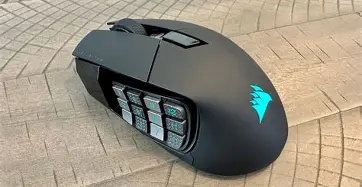
Key headline specs: 16 programmable buttons (including a 12-button adjustable Key Slider side cluster), Corsair MARKSMAN optical sensor (up to 26,000 DPI), SLIPSTREAM wireless with ultra-low latency, Bluetooth + wired USB-C modes, onboard profile storage, and customization via Corsair iCUE software.
Five hidden features that make a practical difference
1. Adjustable 12-button Key Slider — ergonomic and tactical customization
Most multi-button mice offer a fixed thumb grid. The Scimitar Elite Wireless's Key Slider allows users to physically slide the 12-button side panel forward or backward to match thumb length and finger placement. That adjustment isn’t merely ergonomic: it changes how quickly a player can access the center of the cluster and alters the muscle memory needed to reach frequently used hotkeys.
Real-world use case: MMO players who switch between action bars, or creators who assign macros for repetitive timeline commands, will find they can reduce mispresses and speed up input by dialing in the thumb cluster position. For people with larger or smaller hands, the slider can minimize thumb strain during long sessions.
2. Dual wireless modes for latency vs. battery-life trade-offs
The Scimitar Elite Wireless supports Corsair SLIPSTREAM (a sub‑1 ms, ultra-low-latency wireless mode) and a more power-efficient Bluetooth mode, plus a wired USB-C connection. Many users don’t realize how useful switching between those modes can be. SLIPSTREAM is ideal for competitive gaming where every millisecond counts; Bluetooth is suited for laptop use, streaming setups, or when the mouse must be paired with a tablet or a second device to conserve battery.
Real-world use case: a streamer could leave SLIPSTREAM enabled on their gaming PC, and pair the mouse with a tablet or laptop via Bluetooth for quick multi-device control. Alternately, switching to Bluetooth while traveling extends battery longevity without disabling the mouse’s functionality.
3. Onboard profile storage and portable macro memory
Beyond desktop software customization, the Scimitar Elite Wireless stores profiles on the mouse itself. That means key remaps, macro sequences and DPI stages can travel with the mouse without requiring Corsair iCUE to be installed on every machine used. For people who attend LANs, game on shared PCs, or move between work and home, onboard profiles reduce setup friction.
Real-world use case: a content creator can store a video-editing macro layout and a separate MMO layout on the mouse and switch between them on different systems without having to reinstall drivers or reconfigure settings each time.
Shop the latest Electronics picks on Amazon.
See Deals →4. Ultra-polling and high DPI tuned for wireless stability
Wireless mice historically traded responsiveness for freedom. The Scimitar Elite Wireless closes that gap by supporting ultra-polling (up to 2000 Hz in SLIPSTREAM mode) and a high-end optical sensor (the Corsair MARKSMAN sensor) with sensitivity up to 26,000 DPI. The combination improves tracking precision and reduces perceived lag, making the mouse feel closer to a wired device in practical use.
Real-world use case: players who switch between fast-paced FPS titles and precision‑dependent target selection in MMOs benefit from the ability to set high polling rates during gameplay and step them down to conserve battery when responsiveness is less critical.
5. Fast charging and realistic battery reporting
Battery life is a top concern for wireless peripherals. The Scimitar Elite Wireless balances this with a large internal battery and a charging system designed to replenish the mouse quickly. In practical terms, the mouse can achieve long run times (manufacturer figures indicate extended hours with conservative lighting) and returns to usable charge in a short period. Integrated battery reporting via iCUE gives accurate estimates of remaining runtime and charging status, helping users plan sessions without unexpected dropouts.
Real-world use case: during an intense gaming session or an important edit session, a quick top-up between matches or rendering jobs can be sufficient to finish the next hour of work; accurate battery indicators prevent mid-session surprises.
Detailed product analysis
Beyond the five hidden features, the Scimitar Elite Wireless stands on a foundation of solid hardware and thoughtful software. The MARKSMAN optical sensor delivers consistent tracking across common gaming surfaces, and the PTFE feet provide a smooth glide without grabbing. The 16 programmable buttons—16 when counting the main buttons, clickable wheel and thumb cluster—give a lot of direct-access inputs for users who rely on macros and complex bindings.
Corsair’s iCUE software is a big part of the experience. It provides per-button programming, multi-key macro recording, lighting control and DPI stage configuration. For users who want fine-grained control, iCUE also supports profile switching and game detection, which can automatically load different layouts depending on the active application. The onboard profile storage means those configurations are not locked behind the software—useful for compatibility at LAN events or when using unfamiliar machines.
Ergonomically, the Scimitar Elite Wireless is a right-handed mouse with a contoured body aimed at palm to claw grips. The Key Slider helps tailor the thumb position, but the overall shape favors users who like a pronounced thumb rest and a larger, more substantial grip. For smaller-handed users who prefer fingertip grips, the mouse may feel large.
Noise and tactile feedback are also part of the picture. The mechanical switches on Corsair mice tend to be crisp and long-lasting, and the click feel is suited to fast gaming inputs as well as repetitive macro use for productivity tasks.
Pros & Cons
- Pros:
- Extensive button set (16 programmable inputs) with adjustable Key Slider for tailored reach
- Multiple connectivity modes: SLIPSTREAM low-latency wireless, Bluetooth, and wired USB-C
- High-quality optical sensor (up to 26,000 DPI) and ultra-polling up to 2000 Hz in SLIPSTREAM
- Onboard profile storage for portable settings and macros
- Long battery life with fast-charging capability and useful battery reporting in software
- Cons:
- Right-handed, larger form factor may not suit smaller hands or left-handed users
- Complex software (iCUE) can be overwhelming for beginners and requires time to master
- Thumb-cluster learning curve—extensive customization required to get maximum benefit
- Wireless high-polling modes can reduce battery life significantly if left enabled
Comparison: Scimitar Elite Wireless vs common alternatives
For buyers evaluating MMO-style mice, a comparison helps position the Scimitar Elite Wireless against broadly similar options. The table below compares the Scimitar Elite Wireless with two representative alternatives: a wired MMO mouse (for those who prioritize feel and price) and a competing wireless MMO mouse.
Looking for the best Electronics deals on Amazon?
Browse Now →| Model | Button cluster | Sensor DPI | Connectivity | Battery / Power | Best for |
|---|---|---|---|---|---|
| Corsair Scimitar Elite Wireless | 16 programmable (12-button adjustable Key Slider) | Up to 26,000 DPI | SLIPSTREAM (low-latency), Bluetooth, wired USB-C | Long runtime; fast recharge; onboard battery reporting | MMO players who want wireless freedom with advanced customization |
| Wired MMO mouse (representative) | 12–17 programmable buttons, fixed grid | Up to 18,000–26,000 DPI (varies) | Wired USB | No battery concerns | Players who prefer maximum responsiveness and lower cost |
| Competing wireless MMO (representative) | 12 programmable buttons | Up to 30,000 DPI (varies by model) | Low-latency wireless, sometimes single-mode | Good to excellent; varies by model | Users who want alternative feel or brand ecosystem |
Buying guide: how to decide if the Scimitar Elite Wireless is right
1. Define primary use: MMO vs productivity vs mixed
If the majority of use is MMO or games that benefit from many direct bindings, the Scimitar Elite Wireless is a natural fit. For users who mostly play FPS titles where fewer buttons and minimal weight are priorities, a smaller mouse with a simpler thumb layout may be preferable. For productivity work (video editing, spreadsheet macros), the Scimitar’s button density and macro capability can speed up workflows—make sure to map and organize macros to avoid accidental presses.
2. Evaluate hand size and grip style
Try to test the mouse in a store or with a friend if possible. The Scimitar favors palm and claw grips and is larger than many general-purpose mice. The Key Slider makes thumb reach adjustable, but it does not change the overall bulk. Smaller-handed buyers should verify reach and comfort before committing.
3. Think about connectivity needs
Decide whether low-latency performance or battery longevity matters more. The SLIPSTREAM mode gives near-wired responsiveness for competitive play, while Bluetooth extends battery life and enables pairing with additional devices. If a user anticipates frequent multi-device switching (laptop, tablet, living-room PC), Bluetooth is a valuable option.
4. Factor in software and cross-device portability
Corsair iCUE unlocks most capabilities but some users prefer not to rely on proprietary software. The mouse’s onboard profiles reduce dependency on iCUE, but advanced lighting effects and cloud-synced profiles will still require the software. Consider whether the buyer is comfortable spending time configuring macros and lighting.
5. Battery and charging workflow
Consider how and when the mouse will be charged. If overnight charging is typical, battery life differences may matter less. For prolonged travel or tournament play, fast-charging capability and accurate battery reporting are practical advantages—look for a charging routine that matches the user’s schedule.
6. Mapping out a customization plan
Before buying, sketch how the extra buttons would be used. Assign groups of macros or navigation commands by application (game profiles, editing profiles) and verify the number of easily reachable buttons aligns with real needs. The Key Slider makes ergonomic reach tunable, but a poorly planned button map will still lead to mispresses or confusion in the heat of use.
Practical tips for setup and use
- Start with conservative DPI and polling rates: High DPI and 2000 Hz polling can feel twitchy out of the box. Lower the DPI to a comfortable level and increase gradually.
- Use the Key Slider to reduce mispresses: Moving the cluster a few millimeters forward often reduces thumb collisions on dense bindings.
- Store essential macros onboard: Save at least one universal profile on the mouse for machines without iCUE so key customizations travel with the device.
- Pair via Bluetooth for multi-device workflows: If switching between workstation and living-room devices, connect the mouse via Bluetooth for the secondary device to avoid re-pairing.
- Monitor battery in iCUE and keep a charging routine: Enable low-power profiles for non-competitive sessions to extend battery life.
Conclusion
The Corsair Scimitar Elite Wireless is more than a high-DPI MMO mouse: it’s a thoughtfully engineered tool for users who rely on dense input sets and value wireless flexibility. The five hidden features discussed—adjustable Key Slider, dual wireless modes, onboard profile storage, ultra-polling/high-DPI tuning, and practical fast-charging with accurate battery reporting—turn headline specifications into meaningful advantages during real use. Buyers should weigh ergonomics and customization needs, test grip comfort if possible, and plan a mapping strategy that turns the extra buttons from a gimmick into genuine productivity or competitive advantage. For MMO players and heavy macro users who want the convenience of wireless without sacrificing responsiveness, the Scimitar Elite Wireless is worth a close look.